Business Calender
The Business Calendar function allows users to maintain multiple calendars, each with unique or recurring appointments, which can be utilized for the temporal activation and deactivation of alert rules within the alert system.
After selecting the Business Calendar view from the navigation bar, a dropdown menu will appear, allowing you to choose an existing calendar or create a new one. To create a new calendar, simply enter a unique name and, optionally, a description.

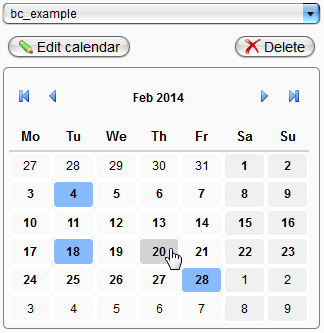
Upon selecting an existing calendar or creating a new one, the standard view is displayed. The upper section of this view includes buttons for modifying or deleting the entire calendar. Use the arrow keys for monthly or yearly navigation. Days with appointments or that match periodic entries are highlighted. For calendars with fewer entries, it is advisable to use the yearly overview, accessible by clicking on the month.
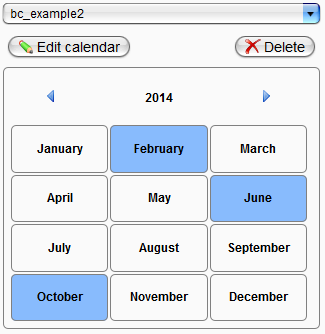
Months containing existing calendar entries are similarly highlighted in the yearly overview. The specific monthly overview can be accessed by clicking on the month's name.
A single day displays a list view of all its entries. On the right side, each entry includes options for viewing/editing (indicated by a pen icon) and deleting (represented by a red "X").
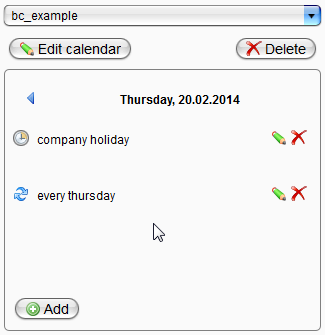
At the bottom, there is a button for adding a new calendar entry. Clicking this button opens the "Create Calendar Entry" dialog.
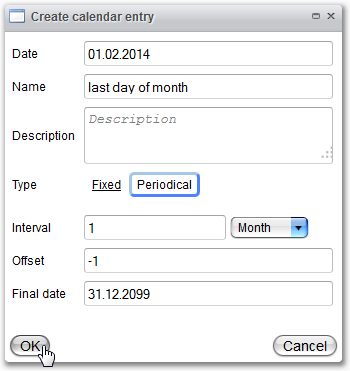
When creating or modifying a calendar entry, general information must be provided in the upper section, where the description is optional. The type selection determines whether the appointment occurs as a unique event or on a recurring basis.
If the periodic type is selected, the lower part of the dialog will become active. All fields must be filled! The date in the upper section serves as the start date, and the appointment will populate the calendar from this date onward at the selected interval until the specified end date.
The Offset field indicates a shift of the appointment by the specified number of days. The default value is 0, which should only be used for declarations of the month's end. As illustrated in the figure above, -1 signifies the day before the first day of the month (and similarly for -2, etc.).